

Ready for some juicy freebies??
 Ready for some juicy freebies?? 🙂
Whether you are a small business owner, developing a non-profit, or working in the marketing department of a big-name B2B company, you know that social media needs to be part of your marketing mix.
And you’ve probably yourself the question, “How do I make time for all of this!?”
I don’t recommend things I wouldn’t use myself. This post will provide easy links, quick summaries, and any personal observations I think you might find helpful…
Here are 6 FREE social media tools – No foolin’ around:
1) EVERNOTE – Ever wish you could clip and save things you experience without carrying around pen and paper? Want to easily save articles to read later? Evernote is like the virtual sticky note pad that syncs to every point where you access the web!
Ready for some juicy freebies?? 🙂
Whether you are a small business owner, developing a non-profit, or working in the marketing department of a big-name B2B company, you know that social media needs to be part of your marketing mix.
And you’ve probably yourself the question, “How do I make time for all of this!?”
I don’t recommend things I wouldn’t use myself. This post will provide easy links, quick summaries, and any personal observations I think you might find helpful…
Here are 6 FREE social media tools – No foolin’ around:
1) EVERNOTE – Ever wish you could clip and save things you experience without carrying around pen and paper? Want to easily save articles to read later? Evernote is like the virtual sticky note pad that syncs to every point where you access the web! 
- Clip an entire article or just the web address.
- Write your own note.
- Create notebooks to categorize/organize.
- Tag notes by topic or key words for easy finding.
- Access from your desktop, laptop, or mobile phone.
- Released today – Facebook Sharing!
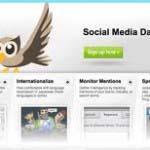 Here’s what you get for free:
- Schedule status updates to chosen social networks.
- 5 Social Profiles – Mix & match from the options listed above.
- 2 RSS/Atom Feeds.
- Social Analytics – “Social listening” to track your social media ROI.
- Make Twitter lists to keep up with specific people or industries.
- Create key word searches on Twitter.
- Choice of color theme on your dashboard.
- Advertisements within your feed stream.
- How-to video tutorials for professional purposes.
- Helping family and friends understand things you already know.
- Sharing groovy online finds with collaborating team members.
- Friendly greetings to others letting them experience an online trail you provide.
 Have you connected your Slideshare with your LinkedIn Profile? You can do that at no charge via LinkedIn.
Wait, did I say Zipcast? Ooooooohhhh, baby, yessss I did! I. LOVE. THIS. FEATURE!! 🙂
Very recently released. As easy as a click of a button, Zipcast allows you to meet online. Show yours or someone else’s presentation in a public or private setting. Stream your conversation while referring to a presentation, and take questions via type chat. It’s very easy, and even FUN!
Recently, I sat in on a Zipcast given by a favorite social media super-star, Mari Smith. Mari gave her webinar, “5 Facebook Metrics You Should Be Measuring To Grow Your Business.” Hundreds of people were there as she went through her presentation and talked with everyone LIVE!
It was a Pot O’ Gold on St. Patty’s Day!
Here’s a screenshot of Mari’s Zipcast – “5 Facebook Metrics You Should Be Measuring To Grow Your Business”:
Have you connected your Slideshare with your LinkedIn Profile? You can do that at no charge via LinkedIn.
Wait, did I say Zipcast? Ooooooohhhh, baby, yessss I did! I. LOVE. THIS. FEATURE!! 🙂
Very recently released. As easy as a click of a button, Zipcast allows you to meet online. Show yours or someone else’s presentation in a public or private setting. Stream your conversation while referring to a presentation, and take questions via type chat. It’s very easy, and even FUN!
Recently, I sat in on a Zipcast given by a favorite social media super-star, Mari Smith. Mari gave her webinar, “5 Facebook Metrics You Should Be Measuring To Grow Your Business.” Hundreds of people were there as she went through her presentation and talked with everyone LIVE!
It was a Pot O’ Gold on St. Patty’s Day!
Here’s a screenshot of Mari’s Zipcast – “5 Facebook Metrics You Should Be Measuring To Grow Your Business”:
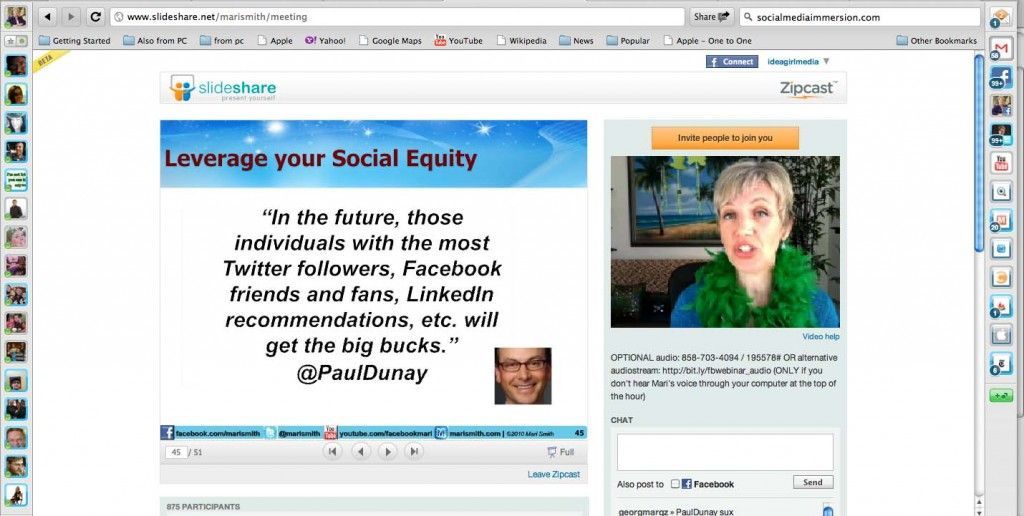
Mari quotes Paul Dunay on the importance of Social Equity
Click the image to learn the 5 Facebook metrics you should be measuring to grow your business!
Extra value – You get two webinar replays! Access them here, and learn how Mari is giving to the American Red Cross through her Social Media Immersion program. Their claims: “It’s free and simple. No downloads for anyone. Public when you want your ideas to spread. Private when it’s you and a colleague.” My observations: A wonderful opportunity for small business owners and big business professionals to engage their audiences!! 5) WIBIYA – Want your website visitors to stay longer? Interested in converting more of your prospects to paying customers? Wibiya is a clever little tool bar designed to make your website/blog audience “sticky.” Meaning, they engage with your page! If you look toward the bottom of your screen, you should see my Wibiya bar – customized to match my website theme. I’ve chosen apps that connect to my preferred social networks.
Go ahead – click away and see what you find – If you click the Facebook Like button, I’d be so honored! 😉
What you’ll like about Wibiya:
If you look toward the bottom of your screen, you should see my Wibiya bar – customized to match my website theme. I’ve chosen apps that connect to my preferred social networks.
Go ahead – click away and see what you find – If you click the Facebook Like button, I’d be so honored! 😉
What you’ll like about Wibiya:
- Easy to install – If I can do it, so can you!
- Free interactive applications.
- No programming; No coding.
- Integration with Facebook & Twitter.
- Analytics dashboard – See what makes your visitors “sticky.”
- See what global location your visitors are coming from.
- Keep my daily To-Do list.
- Store links I refer to often.
- Keep track of my short term or spontaneous social media content.
- Note important material to include in my bi-weekly Media Muffins E-newsletter.
- List details to report to clients.
- Unscramble miscellaneous thoughts that evolve into projects.
2 Replies
-
Thanks for sharing these free social media tools, i am going to try them right now… Am so exited.
-
Mike, Glad to provide helpful information — Good luck! Please feel free to post any questions you might have. Thank you for your comment, ~Keri
-

Leave a Reply

Subscribe To The Newsletter
Like what you see? We've been told our blog posts are like potato chips: You can't read just one...
Subscribe to receive them fresh in your Inbox, and you can grab our best insights about social media marketing before everyone else sees it!

Relevant Resources
view allThe True Cost Of Letting Peak Sales Periods Pass You By

Are you looking to grow your business and develop your team? Education always pays off — Here are seven ways…...
Three Surprising Signs You’re Still Silencing Your Female Employees

Learn how to identify and address subtle behaviors on your teams that may still be silencing female employees in your…...
How Ongoing Training In The Workplace Can Drive Long-Term Business Growth
Ongoing training and development is more than just an investment in your employees – the cornerstone of your company’s success.…...





























By Mike on